


Get the Representative AI Search Prompt Library Workbook
Updated on June 17, 2026
One of the biggest mistakes I see with AI search tracking is using a non-representative prompt library to assess a brand’s AI search visibility. This can give you an inaccurate view of your AI search presence: if the prompt set over-represents generic discovery prompts, ignores product lines, misses local competitors, or only tracks branded questions, your AI visibility dashboard can look useful while pointing you toward the wrong priorities.
A defensible AI search prompt library should help you understand where your brand appears, where it’s missing, how it’s represented, which sources shape the answers, which competitors are preferred, and what you should fix next.
The goal isn’t to track every possible prompt but to build a representative prompt sample for the AI-assisted journeys that matter most to your business.
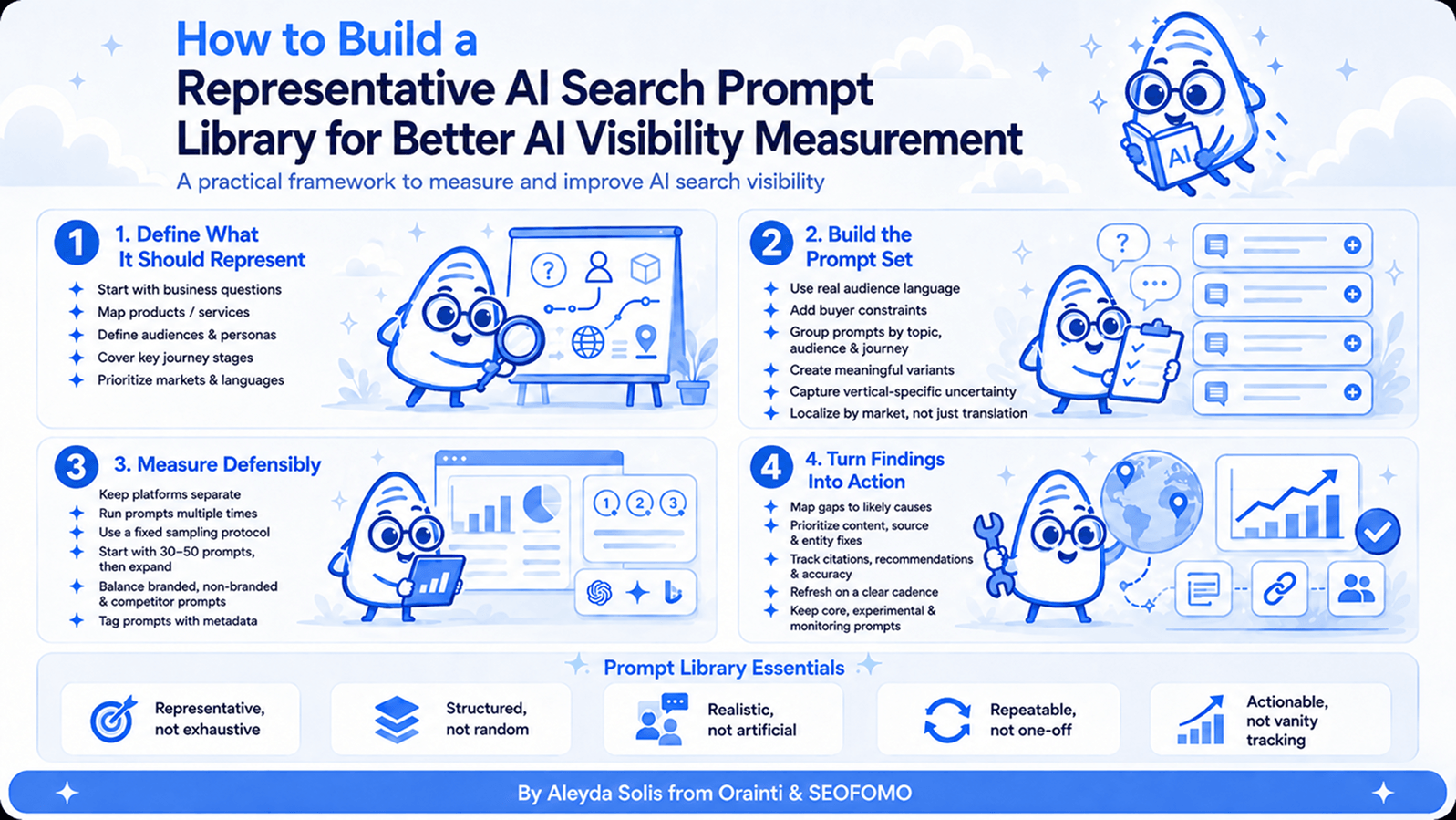
A representative AI search prompt library shouldn’t be a random list of prompts or a tool’s default prompt set. It should be a structured sample of the AI-assisted journeys that matter to your business, covering the right products, audiences, markets, journey stages, competitors and buyer constraints. The goal is to measure the right prompts well enough to identify patterns, diagnose gaps and guide optimization actions.
This guide will help you do exactly that and focuses on the input layer of AI Search measurement: the prompt set. It covers:
- What an AI search prompt library is.
- The biggest mistakes to avoid.
- Why representative doesn’t mean exhaustive.
- How to define what the prompt library needs to represent.
- How to build, group and localize prompts.
- How to measure AI search visibility defensibly.
- How to turn prompt findings into optimization actions.
- What a final prompt library can look like.
It complements my 3-layer framework for measuring AI Presence, Readiness and Business Impact, The 10 Key Characteristics of AI Search Winning Brands and the AI Search Optimization Checklist that turns those findings into actions.
What’s an AI search prompt library?
An AI search prompt library is a structured set of prompts used to test, monitor and analyze how a brand appears across AI search experiences. It is the input layer of AI search measurement: the prompt set you use to understand whether your brand is visible, cited, accurately represented, recommended or missing across the AI-assisted journeys that matter.
- Does the brand appear for the prompts that matter?
- Is it recommended, or only mentioned?
- Is it cited or linked?
- Is it described accurately?
- Which competitors appear?
- Which sources shape the answers?
- Does visibility differ by platform, market, language, product line, audience or journey stage?
- Which gaps should be fixed first?
The goal is to build a representative prompt set that’s robust enough to identify patterns, track changes and guide action.
AI search prompts are often longer, more conversational, more constrained and more task-oriented than traditional search queries. They can also change meaning significantly depending on the user’s context: country, budget, product requirement, industry, buyer role, platform, urgency and stage in the journey. That’s why the prompt library needs structure.
The biggest mistakes to avoid when building an AI search prompt library
Before going into the process, let’s start with what usually goes wrong when creating prompt libraries:
- Assuming an AI visibility tool’s default prompt set is representative: AI visibility tools can be very useful for collection, monitoring and reporting, but their default prompt sets won’t automatically reflect your products, audiences, markets, competitors, constraints or business priorities. Use the tool as infrastructure, but validate and customize the prompt library before using it for prioritization.
- Tracking only generic prompts: Generic prompts such as “best CRM software” or “best running shoes” can be useful for broad category visibility, but they rarely show the full picture.
- Tracking only branded prompts: Branded prompts are useful to monitor representation accuracy, but they don’t show whether your brand is visible during discovery and selection.
- Using one prompt set globally: A prompt that’s representative in one country can be misleading in another. Countries and languages have different competitors, terminology, source ecosystems, marketplaces, regulations, currencies, trust signals and buying expectations.
- Ignoring product or service line differences: A multi-product or multi-service business shouldn’t use one generic prompt set for everything. Each important offering can have different topics, sources, competitors, features, constraints and decision criteria.
- Ignoring audience or persona differences: Different audiences ask different questions. If the audience changes, the prompt should often change too.
- Ignoring vertical specific uncertainty: Different verticals have different decision friction: A finance prompt needs trust, risk, eligibility and regulation signals; a fashion prompt may need size, fit, material, style and returns; a SaaS prompt may need integrations, onboarding, security, pricing and limitations; etc. Your prompt library should capture the uncertainty users need AI systems to help resolve.
- Overreacting to one prompt run: AI answers vary by platform, session, location, personalization, time and sometimes model version: A single output is one sample, not a fixed ranking. Use repeated runs, consistent conditions and prompt groups to identify patterns instead of making decisions from one snapshot.
- Blending platforms into one score: A brand can be visible in one platform, absent in another, cited in a third and misrepresented in a fourth, so they should be tracked independently and reflect the outcome through separate metrics.
- Creating prompts that are too artificial: A prompt might be well structured but still not useful if nobody would realistically ask it, so use real audience language from search data, site search, People Also Ask, reviews, communities, sales calls, support tickets, CRM notes and AI traffic samples to avoid building a prompt library that only reflects internal assumptions.
- Creating too many near duplicate prompts: More prompts don’t automatically mean better insight. A smaller, well-structured prompt library is better than a large, random one. Create variants when they test a meaningful difference: a different audience, use case, market, competitor, constraint or journey stage.
- Not connecting prompts to actions: If a prompt result doesn’t help you diagnose, prioritize or validate something, reconsider whether it belongs in the library. The goal is to understand what needs to be improved to increase visibility, citations, recommendations and accurate representation.
- Forgetting maintenance: Prompt libraries are not static, they should evolve with product changes, pricing updates, competitor shifts, market expansion, new source ecosystems and AI platform behavior.
Keep a stable core set for comparability, but leave room for experimental and monitoring prompts.
The core principle: representative doesn’t mean exhaustive
A representative prompt library doesn’t need to include every possible way someone could ask about your product, service or category. That would quickly become unmanageable.
A representative prompt library should include the prompt groups that matter most across five dimensions:
- Customer journey stage: discovery, problem-solving, evaluation, comparison, validation, transaction and post-purchase.
- Product, service line or category: because different offerings have different topics, competitors, features and decision criteria.
- Audience or persona: because different users ask different questions, use different language and need different proof.
- Market, country or language: because local competitors, sources, terminology, regulation and trust signals vary.
- Business priority: because not all journeys are equally important to the business right now.
This is the difference between a prompt list and a useful prompt library: A prompt library is a sampling system for the AI-assisted journeys you want to understand and influence.
Start with a minimum viable AI search prompt library
If you’re starting from scratch, don’t try to build the perfect prompt library from day one. It’s better to start with a smaller, structured prompt set that is representative enough to reveal patterns than to create a large prompt list that nobody can interpret, maintain or act on.
A practical first version can look like this:
- Start with 30 to 50 commercially relevant prompts.
Group them by product or service line, audience, market, language and journey stage. - Make sure the prompts reflect business priorities.
Include the products, services, markets, audiences and conversion paths that matter most right now. - Add realistic buyer constraints.
Use constraints such as budget, location, use case, industry, integrations, urgency, trust requirements, feature needs or preferences. - Use real audience language where possible.
Pull from search demand, Google Search Console long-tail queries, People Also Ask, internal site search, sales calls, CRM notes, support tickets, reviews, communities and AI-related data sources. - Run the first set across the most relevant platforms.
Start with the two or three AI search platforms most relevant to your audience instead of trying to test everything at once. - Record the core visibility signals.
Track whether your brand appears, whether it is recommended or only mentioned, whether it is cited or linked, which competitors appear, which sources shape the answer and whether the brand is represented accurately. - Expand only where the first run shows meaningful gaps.
Add more prompts when you find gaps by product line, market, persona, journey stage, competitor set or buyer constraint.
This gives you a useful first version without overcomplicating the process: enough structure to identify patterns, but not so much volume that the library becomes hard to interpret or maintain.
Once you have a practical starting point, the next step is to make sure that first prompt set is representative. That means defining what the library needs to cover before writing or expanding the prompts. Let’s go through the steps to do it below.
Part 1: Define what the prompt library needs to represent
Before establishing the prompts to track, define what the prompt library needs to represent. This is where many AI search tracking projects go wrong: they start by brainstorming prompts instead of clarifying the business areas, audiences, markets, journeys and decisions the prompt set needs to support.
A representative prompt library shouldn’t be a random collection of interesting questions. It should be a structured sample of the AI-assisted journeys that matter most to the business, so the results can help you understand where your brand appears, where it’s missing, how it’s represented, which competitors and sources shape the answers, and which gaps should be prioritized first.
Step 1: Start with the business questions, not the prompts
The first step is to define the decisions the prompt library needs to support. Otherwise, it’s easy to end up with a long list of interesting questions that don’t help you understand the AI search visibility gaps that actually matter to the business.
A useful prompt library should help you prioritize: which products, markets, audiences, competitors, journeys and conversion paths need to be measured, and which visibility gaps would change what you optimize next.
- Which products, services, categories or markets matter most right now?
- Do we need separate prompt groups for different product or service lines?
- Which audiences or personas do we need to represent?
- Do these audiences ask different questions, use different terminology or compare different alternatives?
- Which customer journey stages are most important: discovery, evaluation, comparison, validation, transaction or post-purchase?
- Which countries or languages are strategically important?
- Which competitors should be included by product line, market or audience?
- Which conversion paths matter: purchase, lead, signup, demo, booking, subscription, store visit?
- Which visibility gaps would actually change what we prioritize?
This prevents the prompt library from becoming a generic research exercise. For example, a B2B SaaS company with multiple products shouldn’t only track broad prompts such as: “Best software for marketing teams”.
It should build separate prompt groups for each priority product line, audience segment and market, because the relevant use cases, integrations, competitors, objections and decision criteria may differ significantly.
The same applies to ecommerce, marketplaces, publishers and service businesses. A representative prompt library should reflect the actual structure of the business and the diversity of the audiences it serves, not only the generic category it belongs to.
Step 2: Map the key segmentation layers
Once the business questions are clear, define the segmentation layers the prompt library needs to represent. AI search visibility is rarely uniform across a whole brand: it can change by product line, audience, market, language, use case, competitor set and decision stage.
This is why organizing prompts only by customer journey stage is useful, but not enough. A prompt set can look complete because it covers discovery, comparison and validation, while still missing an important product, a high-value audience, a priority country or a commercially relevant use case.
You need to segment to make sure the prompt library reflects the parts of the business where AI visibility actually needs to be understood and improved.
Use the table below to check whether your prompt library is covering the main dimensions that can change AI search visibility, rather than only organizing prompts by funnel stage.
| Segmentation layer | Why it matters | Example |
|---|---|---|
| Customer journey stage | Captures how users move from discovery to evaluation, comparison, validation and action | “Best tools for…”, “X vs Y”, “Is X good for…”, “Where can I buy…” |
| Product, service line or category | Captures different topics, competitors, features, attributes and decision criteria | A software company tracking prompts separately for analytics, CRM and automation products |
| Audience or persona | Captures different needs, language, constraints, objections and proof requirements | Freelancer vs agency vs enterprise buyer |
| Market, country or language | Captures local terminology, competitors, platforms, sources, regulations and trust signals | US vs Spain vs Germany prompt sets |
| Business priority | Keeps the library focused on prompts that matter commercially or strategically | High-priority product launch, expansion market, profitable category |
The same logic applies across business types: A multi-product SaaS, a multi-category ecommerce site and a multi-audience services business each need prompt groups that reflect their different use cases, competitors, buyer uncertainties and proof requirements, not one generic category set.
Step 3: Define the business model and site type
Different business models need different prompt libraries. A publisher, SaaS company, ecommerce store, marketplace, travel site, local business and B2B service provider do not need the same prompt mix.
The user’s decision process is different, the required proof is different, the sources AI systems may rely on are different, so the best optimization actions will also differ.
Use this table to adapt your prompt library to the type of site you’re measuring, since the prompts that matter for an ecommerce site, SaaS business, marketplace, publisher or local business won’t be the same.
| Business model / site type | Prompt library should include |
|---|---|
| Ecommerce | Product, category, comparison, attribute, price, availability, compatibility, review, return, shipping and “best for” prompts |
| Marketplace | Category, seller, trust, availability, coverage, policy, comparison, location and transactional prompts |
| SaaS | Use case, industry, company size, pricing, integration, alternative, comparison, security, onboarding and limitation prompts |
| B2B services | Problem, service, expertise, industry, location, process, pricing model, proof, alternative and vendor shortlist prompts |
| Local business | “Near me,” city, neighborhood, service, opening hours, reviews, booking, emergency, pricing and trust prompts |
| Travel | Destination, itinerary, hotel, flight, transport, seasonality, budget, family/couple/business, activity and booking prompts |
| Finance | Trust, risk, regulation, fees, comparison, eligibility, product type, local regulation and institution credibility prompts |
| Healthcare | Condition, treatment, provider, symptoms, eligibility, location, insurance, credibility and safety prompts |
| Publisher / media | Explainer, reference, data, trend, definition, comparison, “what happened,” “why it matters” and source-citation prompts |
| Education | Course, degree, certification, career outcome, cost, location, online/offline, accreditation and comparison prompts |
For example:
- For ecommerce: You need prompts that capture product attributes, comparisons, buyer uncertainty and post-purchase friction.
- For SaaS: You need prompts that capture use case fit, integrations, security, pricing and alternatives.
Step 4: Map the customer journey stages you need to influence
AI search visibility can change significantly depending on where the user is in the decision journey. A brand might appear in broad discovery prompts but disappear when users ask for comparisons, alternatives, proof, pricing, availability or post-purchase help. This is why a representative prompt library shouldn’t only track the top of the funnel.
You don’t need the same number of prompts for every stage. Instead, include the stages that matter most to your business and make sure you’re not confusing visibility in one stage with visibility across the whole journey. The most actionable gaps often appear when users move from “what are my options?” to “which one should I trust, choose, buy, book or use?”
Use this journey stage table to make sure you’re not only tracking broad discovery prompts, but also the evaluation, comparison, validation, transactional and post-purchase prompts that often show more actionable visibility gaps.
| Stage | What the user is doing | Example prompt pattern |
|---|---|---|
| Discovery | Understanding options or category | “What are the best tools for…” |
| Problem-solving | Looking for a way to solve a task | “How can I…” |
| Evaluation | Checking whether a brand fits a need | “Is [brand] good for…” |
| Comparison | Comparing named options | “[Brand A] vs [Brand B] for…” |
| Alternatives | Looking beyond a known option | “Best alternatives to…” |
| Shortlist | Asking what to consider | “Which providers should I shortlist for…” |
| Validation | Checking credibility, reviews or risk | “Is [brand] trustworthy / reliable / worth it?” |
| Transactional | Looking for where or how to buy, book or sign up | “Where can I buy / book / subscribe to…” |
| Support / post-purchase | Solving issues after choosing | “How do I return / cancel / integrate / fix…” |
The most commercially useful prompts are often not the broadest ones: “Best CRM software” might be useful for category visibility, but “Best CRM for a 20-person B2B SaaS team using HubSpot and Slack” is often more representative of an actual buyer decision.
For ecommerce, “best running shoes” is broad. A more useful prompt might be: “Best running shoes for beginner runners training on wet city pavements under €120”.
The more representative the prompt, the more useful the visibility signal.
Step 5: Build a prompt matrix before writing individual prompts
Before writing individual prompts, turn the scope you’ve defined into a simple matrix. This is what keeps the prompt library representative instead of random. Without a matrix, it’s easy to create many prompts that look useful but overrepresent one product, one audience, one market or one journey stage while missing the areas that actually matter to the business.
The matrix helps you decide where prompts are needed before you start writing them. It also makes coverage gaps easier to spot: which product lines are missing, which personas are underrepresented, which markets need localized prompts, and which journey stages need more testing.
The matrix should include the main dimensions that can change what users ask, what AI systems answer, which competitors appear and what action you’ll take from the results. At minimum, define:
- Product, service line or category: what part of the business the prompt group represents.
- Audience or persona: who is asking the question and what their role, need or level of knowledge is.
- Market and language: where the prompt should be tested and whether it needs local terminology, competitors, currency, regulation or source ecosystems.
- Journey stage: whether the prompt represents discovery, problem-solving, evaluation, comparison, alternatives, validation, transaction or post-purchase.
- Prompt type: the type of question being tested, such as “best tools,” “alternatives,” “brand vs competitor,” “is [brand] good for…,” “where to buy,” “how to solve…” or “which provider should I choose…”
- Buyer constraint: the specific condition that makes the prompt more realistic, such as budget, location, use case, industry, integration, urgency, compliance, experience level or feature requirement.
- Competitor or alternative set: the brands, marketplaces, aggregators, tools or substitute solutions the user is likely to compare.
- Business priority: whether that prompt group is high, medium or low priority based on commercial value, strategic importance or current business focus.
| Product / service line | Audience / persona | Market / language | Journey stage | Prompt type | Buyer constraint | Competitor / alternative set | Priority |
|---|---|---|---|---|---|---|---|
| Product A | SMB buyer | US / English | Discovery | Best / shortlist | Budget, ease of setup, small team use case | Direct competitors, category leaders, free alternatives | High |
| Product A | Enterprise buyer | UK / English | Comparison | Brand vs competitor | Security, compliance, scalability, integrations | Direct competitors, enterprise platforms, existing vendor alternatives | High |
| Product B | Agency buyer | Spain / Spanish | Evaluation | Use case / integration | Client reporting, workflow fit, local terminology, integrations | Local competitors, global tools, manual workflow alternatives | Medium |
| Service line 1 | Ecommerce teams | Germany / German | Validation | Proof / credibility | Industry experience, platform expertise, local market proof | Local agencies, specialist consultants, in-house team alternative | High |
| Category 1 | Consumer buyer | France / French | Transactional | Where to buy / availability | Price, availability, delivery, returns, local retailers | Marketplaces, retailers, local stores, substitute products | Medium |
This matrix should help you see where the important coverage gaps are. For a simple business, the matrix might be small. For a multi-product, multi-market business, the matrix is what keeps the prompt library from becoming random.
Part 2: Build the prompt set
Once you know what the prompt library needs to represent, you can start building the actual prompt set. This is where the business scope becomes testable: product lines turn into prompt groups, audience needs become realistic questions, buyer constraints add context, and real user language helps keep the prompts grounded in how people actually ask, compare and decide.
The goal isn’t to write as many prompts as possible but to create a structured set that’s realistic enough to reflect AI-assisted journeys and specific enough to reveal useful visibility, representation, competitor and source gaps.
Step 6: Add real buyer constraints
After defining what the prompt library needs to represent, start making the prompts closer to the way people actually ask AI systems for help. Unlike traditional search queries, AI search prompts are often shaped by the user’s specific situation: their budget, location, role, industry, urgency, tool stack, trust requirements, preferences or limitations.
These constraints matter because they can completely change the answer. A broad prompt can show general category visibility, but a constrained prompt shows whether your brand is visible in the more realistic decision contexts where users are trying to choose, compare or validate an option. This is what makes the prompt library more commercially useful than a keyword list.
| Constraint type | Examples |
|---|---|
| Price / budget | free, cheap, premium, under $100, enterprise pricing |
| Audience size | freelancer, small team, mid-market, enterprise |
| Industry / vertical | ecommerce, healthcare, finance, SaaS, education, travel |
| Geography | Spain, UK, US, Mexico, Germany, London, Madrid |
| Language | English, Spanish, French, German, multilingual |
| Use case | reporting, booking, inventory, lead generation, research, compliance |
| Integration | Shopify, WordPress, HubSpot, Salesforce, Slack, GA4 |
| Trust / compliance | GDPR, HIPAA, SOC 2, regulated industry, accredited |
| Urgency | same day, emergency, last minute, next week |
| User profile | beginner, expert, family, agency, startup, enterprise |
| Preference | sustainable, luxury, budget, accessible, fast, low-risk |
A good prompt library deliberately mixes unconstrained prompts with constrained ones:
- Unconstrained prompts show broad category visibility.
- Constrained prompts show whether the brand is visible in more realistic decision contexts.
For example:
- Generic prompt: “Best project management software”.
- Constrained prompt: “Best project management software for a 25-person marketing agency that needs client approvals, Slack integration and recurring task templates”
The second prompt is much more useful if that is the buyer you actually want to influence.
Step 7: Use real audience language from multiple sources
Once you’ve defined the business scope, journey stages and buyer constraints, don’t write the prompts only from your own assumptions. A representative prompt library should also reflect how real users describe their needs, problems, comparisons, doubts and decision criteria.
This is where audience language becomes essential. Search data can show recurring demand and phrasing, but it won’t always reveal the objections, trade-offs, frustrations or proof requirements that users bring into AI-assisted journeys. Sales calls, support conversations, reviews, communities, internal site search and AI-related data can help fill those gaps.
Use these sources to identify the patterns worth turning into prompts: the questions people repeatedly ask, the constraints they mention, the alternatives they compare, the language they naturally use, and the uncertainties they need resolved before taking action:
- Non-branded search demand.
- Google Search Console long-tail queries.
- Top-ranked long-tail queries with low CTR from Google Search Console, such as those you can identify with the SEOFOMO Data Studio dashboard.
- People Also Ask questions, which can be obtained with tools such as AlsoAsked.
- Internal site search data from your own site search functionality.
- Sales calls and CRM notes.
- Support tickets and live chat logs.
- On-site search data.
- Reviews and testimonials.
- Reddit, forums, Slack groups and niche communities.
- Competitor reviews.
- Comparison pages.
- Product documentation and help center queries.
- Social comments.
- AI traffic and prompt samples from relevant tools.
- Bing Webmaster Tools AI Performance data, when available.
- Competitive intelligence platforms, when available.
Not all of these sources represent the same thing, so use them accordingly:
- Search demand, GSC long-tail queries, People Also Ask and internal site search can help you identify recurring questions and phrasing.
- Sales, support and CRM data can help you capture objections, decision criteria and buyer constraints.
- Reviews, communities and competitor reviews can help you understand how users describe alternatives, frustrations and proof requirements.
- AI traffic samples and AI Performance data can help you identify AI-assisted journeys and source behavior that may not be visible through traditional SEO data alone.
When using sales, support, CRM, chat, site-search or customer data, anonymize personal information and follow your company’s privacy, legal and data-use policies before turning that language into prompts.
How to use Bing Webmaster Tools AI Performance data
Bing Webmaster Tools AI Performance data can also help where available. However, it’s important to understand that its grounding queries are not the same as user prompts. Microsoft describes them as key phrases the AI used when retrieving content that was referenced in AI-generated answers, and the data represents a sample of overall citation activity.
Use grounding queries to understand how Microsoft’s AI systems may associate your content with certain topics, entities or information needs, and to stress-test your prompt wording, not as a finished prompt set or a direct replacement for real audience language.
For example, your audience might ask:
- “What is the best tool to track PR story opportunities?”
But a grounding query might look more like:
- “PR opportunity monitoring tools for digital PR teams”
Both are useful, but they aren’t the same. Use audience questions to understand how people ask, compare and decide. Use grounding queries to understand how your cited content may be retrieved, associated or framed within Microsoft’s AI-generated answers.
Step 8: Build prompt groups, not only individual prompts
Once you have collected audience language and turned it into prompts, organize them into meaningful groups before analyzing the results. AI search outputs are too variable to treat one prompt as a standalone “ranking” or final answer. The same prompt can produce different brands, citations and wording depending on the platform, run, session, location and context.
Prompt grouping helps you move from isolated outputs to useful patterns. Instead of reacting to one result, you can understand whether visibility is consistently weak for a product line, audience, market, journey stage, competitor set or type of buyer constraint. This makes the prompt library much more useful for diagnosis, reporting and prioritization.
At minimum, group prompts by:
- Product, service line or category.
- Customer journey stage.
- Audience or persona.
- Market or language.
- Use case.
- Constraint type.
- Competitor set.
- Business priority.
- Prompt type.
- Platform.
For complex sites, this becomes especially important:
- An ecommerce site may need separate prompt groups by category, subcategory, product attribute and buyer need.
- A SaaS company may need separate prompt groups by product, use case, integration, company size and buyer role.
- A services business may need separate prompt groups by service line, industry, client type, location and decision stage.
- A publisher may need separate prompt groups by topic cluster, format, freshness requirement and citation potential.
For reporting, it’s usually more useful to say:
- “Visibility is weak across enterprise buyer comparison prompts for our analytics product in Germany.”
than:
- “We did not appear for this one prompt on Tuesday.”
Prompt groups make patterns easier to identify and reduce overreaction to one-off outputs.
Step 9: Create prompt variants deliberately
Once your prompt groups are defined, create variants only when they help you test a meaningful difference in how users ask, compare or decide. Variants are useful because small changes in context, such as the audience, market, use case, competitor, constraint or journey stage, can change which brands, sources and recommendations appear in AI answers.
The goal isn’t to multiply prompts for the sake of volume. Too many near-duplicate prompts make the library harder to interpret and maintain. A good variant should help you answer a specific question, such as whether visibility changes for a different persona, a more constrained use case, a local market, a comparison prompt or a more commercial stage of the journey.
Use the table below to create prompt variants intentionally, so each variation tests a meaningful difference instead of just adding more near-duplicate prompts.
| Variation dimension | Example |
|---|---|
| Generic vs constrained | “Best accounting software” vs “Best accounting software for freelancers in Spain under €20/month” |
| Informational vs commercial | “How does invoice automation work?” vs “Best invoice automation tools for small agencies” |
| Branded vs non-branded | “Is [brand] good for agencies?” vs “Best tools for agencies managing client approvals” |
| Single market vs local | “Best CRM software” vs “Best CRM software for German B2B SaaS startups” |
| Single language vs localized language | English prompt vs Spanish prompt using local terminology |
| Comparison vs alternatives | “[Brand] vs [competitor]” vs “Best alternatives to [competitor]” |
| Broad persona vs specific persona | “Best software for marketers” vs “Best software for in-house SEO teams at ecommerce companies” |
| Feature vs outcome | “Tools with Slack integration” vs “Tools to alert PR teams when a story opportunity appears” |
Don’t create variants just to inflate the prompt count. Create variants when they help you test a different audience, decision, source ecosystem or optimization requirement.
Step 10: Adapt the prompt library by vertical and buyer uncertainty
The level and type of uncertainty behind a prompt changes by vertical, so the prompt library should reflect the decisions users actually need help making in that industry.
Someone choosing skincare may ask about ingredients and skin type, while someone comparing finance products may need trust, regulation, fees and risk. A SaaS buyer may care about integrations and onboarding, while a travel user may care about timing, budget, location and availability.
This is important because AI systems are often used to reduce uncertainty before a decision. If your prompts don’t capture the specific doubts, risks, proof requirements and comparison criteria of your vertical, the results may show broad visibility but miss the moments where users are actually deciding.
Use this table to identify the specific uncertainties your prompts should capture by vertical, since different industries require different types of proof, comparison and risk reduction.
| Vertical | Buyer uncertainty to capture in prompts |
|---|---|
| Ecommerce beauty | Ingredients, skin type, reviews, safety, suitability, price, availability |
| Ecommerce electronics | Specs, compatibility, durability, comparisons, reviews, price, warranties |
| Ecommerce fashion | Size, fit, material, occasion, returns, availability, style, reviews |
| Sports and outdoors | Skill level, activity, terrain, weather, safety, durability, equipment fit |
| Travel | Location, timing, itinerary, budget, availability, transport, traveler type, booking friction |
| Finance | Trust, regulation, fees, risk, eligibility, product fit, institution credibility |
| Healthcare | Safety, expertise, condition, eligibility, location, treatment options, insurance |
| SaaS | Use case fit, integrations, pricing, onboarding, security, scalability, limitations |
| B2B services | Expertise, process, proof, industry experience, deliverables, pricing model, fit |
| Local services | Proximity, availability, reviews, price, emergency need, trust, opening hours |
This is where many prompt libraries fail. They track generic category prompts, but they do not capture the specific uncertainty that makes users ask AI systems for help.
Step 11: Localize prompts by market, not only by language
For international AI search measurement, localization means much more than translating the same prompt into another language. A prompt that is representative in one market can become misleading in another if it ignores local competitors, terminology, regulations, currencies, sources, marketplaces, directories, buying habits or trust signals.
This is fundamental because answers can be shaped by the sources, brands and institutions that are visible and trusted in each market. So if the local source ecosystem changes, the prompt library should change too.
A market-specific prompt library should reflect:
- Local competitors.
- Local platforms.
- Local publishers and sources.
- Local marketplaces and directories.
- Local regulations.
- Local currencies and units.
- Local terminology.
- Local buying habits.
- Local trust signals.
- Local product availability.
- Local service expectations.
For example, a travel prompt for the US market might produce a different source ecosystem from a travel prompt in Spain, France or Mexico.
This is why international AI search measurement shouldn’t rely on a translated global prompt set alone. It needs market-specific prompts that reflect how users ask, compare, trust and decide in each country.
Ecommerce prompts might surface local marketplaces, local retailers or local infrastructure instead of global defaults. Finance prompts might depend heavily on local institutions and regulation. This means you need to build country-level prompt sets for priority markets, not only translate the global list.
Localization checks
Ask:
- Would a local user ask this prompt in this way?
- Are we using the right local terminology?
- Are local competitors included?
- Are local constraints included?
- Are local sources likely to shape the answer?
- Does the prompt reflect local regulation, availability or pricing?
- Should this be tested in the local language, English, or both?
- Should the prompt include location modifiers such as country, region or city?
A prompt that is representative in one country can be misleading in another.
Part 3: Measure defensibly
Once the prompt library is representative, the next challenge is making the results reliable enough to use for decisions. AI search outputs are not static rankings: they can vary by platform, run, session, location, language, personalization and timing. This means the way you collect and compare results matters as much as the prompts themselves.
A defensible measurement process should help you identify patterns instead of overreacting to individual outputs. The goal isn’t to treat one answer as the truth, but to track results consistently enough to understand where your brand is repeatedly present, absent, cited, recommended or misrepresented, and where those patterns are strong enough to guide action.
Step 12: Include platform-specific testing without blending results
Once you have a measurement protocol, keep platform behavior separate. AI search visibility is not uniform across Google AI Overviews, AI Mode, ChatGPT, Perplexity, Gemini, Copilot or other AI search experiences. The same prompt can surface different brands, sources, citations, links and recommendations depending on where it is tested.
This is why platform-specific tracking matters. A brand might be recommended in one platform, absent in another, cited without a link in a third, or described differently across experiences. If you blend all platforms into one generic “AI visibility” score, you can hide the differences that actually explain where the opportunity or risk is.
Depending on your market and audience, you might test across:
- Google AI Overviews.
- Google AI Mode.
- ChatGPT.
- Perplexity.
- Gemini.
- Copilot.
- Claude.
- Other vertical, local or platform-specific AI experiences.
The goal is not to test every platform forever. The goal is to prioritize the platforms most relevant to your audience and business, while keeping results separate enough to understand where visibility is changing.
Use these platform testing principles:
- Use the same core prompt groups across priority platforms when you want comparison.
- Keep platform results separate in reporting.
- Track citations, links and source visibility where the platform surfaces them.
- Record answer accuracy and recommendation behavior.
- Don’t assume visibility in one platform means visibility in another.
- Don’t assume a platform without visible citations has no source influence.
Step 13: Define your sampling and measurement protocol
A representative prompt library only produces reliable signal if you also control how you run it. AI answers are non-deterministic. The same prompt can return different brands, sources, citations and recommendations across runs, sessions, accounts and locations. A single output is one sample of a distribution, not a fixed ranking.
So before scaling, define the conditions under which every prompt is run, and treat presence as a rate across repeated samples rather than a yes/no from a single check. This is the difference between a defensible measurement system and a screenshot.
Use the table below to define a repeatable measurement protocol, so your AI visibility findings are based on comparable samples rather than isolated screenshots.
| What to control | Recommended default |
|---|---|
| Runs per prompt | Sample each core prompt multiple times, such as 3–5 runs, and report Presence as a frequency, not a single result. Increase runs for high-variability or high-priority prompts. |
| Measurement window | Run a full cycle within a short, fixed window, such as the same 24–72 hours, so platform or index changes do not contaminate a single snapshot. |
| Session state | Default to a clean, logged-out, history-free session so results reflect general visibility, not your own account. Add a separate logged-in pass only when personalization is itself the question. |
| Personalization and location | Control or record location, language and account memory. The same prompt can resolve differently by country, so set locale explicitly and tag it rather than letting it vary silently. |
| Platform and version | Record the platform and, where visible, the model or experience version. Do not compare results across versions as if conditions were constant. |
| Collection method | Note whether results were collected manually or via tooling, keep the method consistent, and respect each platform’s terms. Manual and automated prompting can surface different answers. |
How to read the results:
- Treat Presence as a frequency, for example: “appears in 4 of 5 runs,” not a binary.
- Distinguish stable signal from noise.
- Only compare like with like: same platform, same session conditions, same measurement window.
- Re-baseline after any known platform, product or model change.
- Do not read pre/post-change movement as your own performance if the platform itself changed.
Without a stated protocol, an “AI visibility” number is not reproducible enough to support prioritization or reporting.
Step 14: Decide how many prompts you actually need
You don’t need to track every possible prompt combination, that’s impossible and usually not useful: use pragmatic sampling instead. The right size depends on the complexity of the business.
The following ranges aren’t benchmarks or universal rules. They’re pragmatic starting points to avoid two common problems: under-sampling important journeys or creating a prompt library so large that nobody can interpret or maintain it.
Use these ranges as a practical starting point to size your prompt library according to business complexity, while keeping it manageable enough to analyze and act on.
| Business complexity | Suggested starting point |
|---|---|
| Single product / single market / limited audience | 30-60 prompts |
| Multi-product site / one main market | 60-150 prompts |
| SaaS or services with multiple personas and competitors | 100-250 prompts |
| Ecommerce with multiple categories | 150-500 prompts, sampled by category and subvertical |
| Marketplace with many supply/demand sides | 200-500+ prompts, grouped by category, user type and market |
| International site with multiple priority markets | Separate market-level prompt libraries, starting with 30–100 prompts per priority market |
| Enterprise / multi-brand / multi-country | Modular prompt library by brand, market, product line and journey stage |
Use these ranges as a starting point, then adjust based on business complexity, market variability, platform differences and how much of the data your team can realistically analyze and act on. A smaller, well-structured prompt library is better than a large, random one.
Step 15: Balance branded, non-branded and competitor prompts
A representative prompt library should include branded, non-branded and competitor prompts because each one answers a different visibility question:
- Non-branded prompts show whether your brand appears during discovery and selection.
- Branded prompts show whether AI systems understand and describe your brand accurately.
- Competitor and alternative prompts show how your brand is positioned when users compare options.
The right balance depends on what you’re trying to measure:
- If your goal is discovery visibility, non-branded prompts should usually carry more weight.
- If your goal is reputation or representation accuracy, branded prompts become more important.
- If your goal is competitive positioning, comparison and alternative prompts need to be included intentionally.
Use this table to balance your prompt mix based on the visibility goal you’re trying to measure, whether that’s discovery, competitive positioning, reputation, product-led growth or local visibility.
| Goal | Suggested prompt mix |
|---|---|
| New demand / discovery visibility | Mostly non-branded prompts |
| Competitive positioning | Comparison and alternatives prompts |
| Brand representation monitoring | Branded and brand + use case prompts |
| Reputation / trust monitoring | Branded validation, review and risk prompts |
| Product-led growth | Use case, integration, pricing and alternative prompts |
| Ecommerce category visibility | Category, attribute, comparison and product prompts |
| Local visibility | Service + location, “near me,” review and availability prompts |
| International expansion | Localized non-branded, competitor and market-specific prompts |
For many brands, non-branded prompts should carry the most weight because they reflect discovery and selection opportunities, but branded prompts are still essential to understand whether AI systems describe the brand accurately.
Step 16: Add competitors and alternatives intentionally
AI search visibility is often shaped by comparison, not just discovery. Users don’t only ask whether a brand exists or whether it is good; they ask which option fits their situation, what alternatives are available, how one provider compares with another, and which choice is safer, cheaper, faster, more trusted or better suited to their needs.
This is why competitors and alternatives should be added deliberately. The goal is not to compare against every possible brand, but to include the options your audience actually considers: direct competitors, category leaders, marketplaces, aggregators, free or DIY alternatives, local providers and substitute solutions. These prompts help you understand whether AI systems position your brand as a viable choice when users are actively narrowing their options.
Include:
- Direct competitors.
- Indirect competitors.
- Marketplaces.
- Aggregators.
- Review platforms.
- Local competitors.
- Open-source or free alternatives.
- DIY alternatives.
- Existing category leaders.
- Brands your sales team hears about most often.
Competitor prompt patterns:
- [Brand] vs [Competitor] for [use case]
- Best alternatives to [Competitor] for [audience]
- Should I choose [Brand] or [Competitor] for [constraint]?
- Which is better for [persona]: [Brand], [Competitor A] or [Competitor B]?
- Best [category] tools like [Competitor] but with [feature/constraint]
Don’t only compare against the brands you want to beat. Compare against the brands your audience actually considers.
Step 17: Tag every prompt with metadata
Once prompts are grouped and tested, metadata is what makes the library useful for analysis. Without metadata, you may know what happened for an individual prompt, but you won’t be able to easily see patterns by product line, audience, market, journey stage, platform, competitor set or business priority.
Metadata turns the prompt library from a list of questions into a diagnostic system. It allows you to segment results, compare equivalent prompt groups, identify where visibility is weak, understand which gaps are likely driving the results, and connect each finding to a clear next action.
Use these metadata fields to make your prompt library easier to segment, compare, diagnose and turn into optimization actions.
| Field | Why it matters |
|---|---|
| Prompt ID | Stable tracking |
| Prompt | Exact wording tested |
| Prompt group | Topic-level analysis |
| Product / category | Connects visibility to business area |
| Audience / persona | Shows whether visibility differs by buyer type |
| Journey stage | Discovery, evaluation, comparison, transaction |
| Prompt type | Best, alternative, comparison, validation, local, etc. |
| Market | Country or region |
| Language | Language tested |
| Business priority | High, medium, low |
| Competitors included | Competitive analysis |
| Constraint type | Price, location, integration, compliance, etc. |
| Platform tested | Results should not be blended |
| Date tested | AI answers change |
| Run number | Helps interpret repeated samples |
| Brand appears? | Prompt coverage |
| Recommended? | Recommendation rate |
| Linked citation? | Linked citation rate |
| Sources cited | Source ecosystem analysis |
| Representation accurate? | Accuracy monitoring |
| Likely gap | Connects Presence to Readiness |
| Next action | Turns measurement into optimization |
This metadata is what makes the prompt library useful for diagnosis, not just tracking.
Step 18: Validate the prompt library before scaling
Before turning the prompt library into a recurring dashboard or scaling it across more platforms, markets or product lines, validate a sample manually. This quality check is important because a prompt library can look complete in a spreadsheet while still being unrealistic, unbalanced, too generic, over-weighted toward one journey stage or disconnected from business priorities.
Manual review helps you confirm that the prompts sound like real users, cover the right segments, include meaningful constraints, surface useful differences and lead to findings your team can actually act on. If the sample doesn’t produce useful diagnostic patterns, adding more prompts will usually make the problem bigger, not better.
Check whether:
- The prompts sound like real users.
- The prompt groups match business priorities.
- The product or service lines are represented appropriately.
- The main audiences or personas are represented.
- The constraints are realistic.
- The market and language variations make sense.
- The platform outputs are relevant enough to track.
- The competitor set reflects real alternatives.
- The results reveal actionable differences.
- The prompt library is not over-weighted toward one journey stage.
- The same prompt is not repeated with minor meaningless variations.
This is where expert judgment matters. If the prompt library does not produce useful diagnostic patterns, adding more prompts will not fix it.
A quick quality check
A good prompt library should be:
- Representative, not exhaustive.
- Segmented, not random.
- Stable enough to compare over time.
- Flexible enough to add emerging prompts.
- Tied to business priorities.
- Connected to optimization actions.
- Measured with a repeatable protocol.
Part 4: Turn prompt findings into action
A prompt library only becomes valuable when its findings lead to better decisions and concrete optimization actions. The goal isn’t to collect AI answers for reporting’s sake, but to understand what those answers reveal: where your brand is missing, when it is only mentioned instead of recommended, how it is represented, which sources influence the answer, which competitors are preferred and what likely needs to be improved.
This is where the prompt library connects with the optimization workflow. Each prompt group should help you move from observation to diagnosis, and from diagnosis to action: what the gap is, why it may be happening, who should own the fix, what should be changed and how you’ll validate whether visibility, citations, recommendations or representation improve over time.
Step 19: Connect prompts to the optimization workflow
Once the prompt results are collected, translate them into an optimization workflow. A result is not useful only because it shows whether your brand appeared or not; it becomes useful when it helps explain what kind of gap you have and what should be fixed next.
For each prompt group, look for the pattern behind the outputs. Is the issue lack of visibility, weak recommendation, missing citations, inaccurate representation, stronger competitor positioning, poor owned content, or a weak third-party source ecosystem? Then connect that pattern to an owner, an action and a validation method so the prompt library becomes part of your AI search optimization process, not just another reporting spreadsheet.
For each prompt group, ask:
- Are we visible?
- Are we recommended?
- Are we linked?
- Are we accurately represented?
- Which sources are shaping the answer?
- Which competitors appear?
- What type of gap is this?
- What should we fix?
- Who owns the fix?
- How will we validate whether it worked?
Use this table to translate prompt findings into likely causes and next actions, so the prompt library becomes an optimization input rather than only a tracking report.
| Prompt finding | Likely implication | Next action |
|---|---|---|
| Brand absent from commercial prompts | Missing decision-support content or weak source ecosystem | Create/improve comparison, use case or alternatives content; audit third-party sources |
| Brand mentioned but not recommended | Weak differentiation, proof or fit | Add clearer positioning, trade-offs, reviews, customer proof and use-case evidence |
| Brand cited through third-party sites only | Owned content may be less useful or less extractable | Improve owned page specificity, freshness, structure, evidence and internal linking |
| Brand misdescribed | Entity or positioning inconsistency | Fix owned descriptions, schema, profiles, directories and third-party sources |
| Competitor wins comparison prompts | Competitor has stronger proof or clearer fit | Improve comparison content, customer proof and third-party validation |
| Local competitors dominate | Market-specific source ecosystem gap | Build local pages, local profiles, reviews, citations and local proof |
| Product details missing | Commercial information not machine-readable | Improve product pages, feeds, structured data, pricing, availability and policy information |
| One persona has visibility but another is absent | Prompt library reveals audience-specific gap | Build or improve content, proof and sources for the missing audience segment |
| One product line is visible but another is not | Visibility is uneven across the portfolio | Audit product-line content, source ecosystem, entity clarity and third-party corroboration |
This is the bridge between the prompt library and the AI Search Optimization Checklist.
Step 20: Define refresh cadence
A prompt library should be maintained, not constantly rebuilt. AI search behavior, competitors, products, pricing, markets and source ecosystems can change, so the library needs a refresh process, but if you change too many prompts too often, you lose the ability to compare results over time.
The goal is to keep a stable core set for recurring measurement while updating the parts of the library that need to reflect real business or market changes. This gives you both comparability and flexibility: enough consistency to track trends, and enough adaptability to capture new products, competitors, markets, platform behavior and user needs.
Use this cadence table to decide what should stay stable for comparability and what should be refreshed as products, competitors, markets and AI platform behavior change.
| What to update | Suggested cadence |
|---|---|
| Priority commercial prompts | Monthly |
| Branded and representation prompts | Monthly |
| Competitor comparison prompts | Monthly or quarterly |
| Product, pricing or availability prompts | After major changes |
| Audience or persona-specific prompts | Quarterly or after major positioning/sales changes |
| International market prompt sets | Quarterly or after market changes |
| Source ecosystem mapping | Quarterly |
| Full prompt library review | Every 6-12 months |
| New product or market launch prompts | Before launch and shortly after launch |
| Major platform behavior changes | As needed |
Don’t change the entire prompt library too often, or you will lose comparability. Instead, keep a stable core set and add experimental prompts separately.
Step 21: Separate core, experimental and monitoring prompts
As the prompt library grows, separate prompts by purpose so it remains useful over time. Not every prompt should be treated the same way: some need to stay stable for recurring measurement, some are useful for testing new opportunities, and some exist to monitor brand, reputation, risk or competitor changes.
This structure helps you avoid two common problems: changing the core prompt set so often that trends become impossible to compare, or keeping every prompt fixed even when products, markets, competitors and user behavior change. A mature prompt library should give you consistency where you need tracking, and flexibility where you need exploration.
A mature prompt library usually has three layers.
- Core prompts: These are stable prompts used for recurring tracking. They should reflect the highest-priority journeys and remain consistent over time.
- Experimental prompts: These test new products, markets, constraints, audiences, competitors or emerging user behavior. They can change more often.
- Monitoring prompts: These track reputation, brand representation, risk, compliance, major competitors or sensitive topics.
This structure gives you stability without becoming rigid.
Quick recap: How to build your first representative prompt library
Building a representative prompt library is easier when you follow a structured sequence instead of trying to brainstorm prompts all at once. The process should move from business scope, to prompt creation, to defensible measurement, to optimization action.
Here’s the process in one place, so you can use it as a checklist when building or reviewing your own prompt library.
1. Define what the library needs to represent
- Define the business scope: products, services, markets, audiences and priorities.
- Identify the business model and site type.
- Map the customer journey stages you need to influence.
- Build a matrix by product or service line, audience or persona, market or language, journey stage, prompt type, buyer constraint, competitor set and priority.
2. Build the prompt set
- Collect real audience language from search, site search, sales, support, reviews, communities and AI-related data sources.
- Add realistic buyer constraints such as budget, location, use case, industry, integration, urgency, trust requirements or feature needs.
- Build prompt groups instead of isolated prompts.
- Add vertical-specific uncertainty based on the decisions users need help making in your industry.
- Localize prompts by market and language, not only by translation.
- Add competitor and alternative prompts intentionally.
3. Make the measurement defensible
- Tag every prompt with metadata, including product line, audience, market, journey stage, prompt type, platform, business priority and competitor set.
- Test a small sample manually before scaling.
- Refine prompts that are too generic, artificial, duplicated or disconnected from business priorities.
- Define the sampling and measurement protocol: runs per prompt, measurement window, session state, location, platform and collection method.
- Run the prompt library across the priority AI search platforms without blending platform results.
4. Turn findings into action
- Record Presence signals such as brand appearance, recommendation behavior, linked citations, cited sources, competitor presence and representation accuracy.
- Identify the likely gap behind each prompt group: visibility, recommendation, representation, source ecosystem, competitor strength, owned content, technical accessibility or business impact.
- Map findings to optimization actions, owners and validation methods.
- Keep a stable core prompt set for recurring tracking, and separate experimental or monitoring prompts.
- Refresh the library periodically as products, competitors, markets, sources and AI platform behavior change.
This process keeps the prompt library practical: representative enough to identify patterns, structured enough to support reporting, and actionable enough to guide AI search optimization priorities.
An example of a relevant prompt library
To show how the pieces connect, let’s use Finchling as an example: a PR opportunity discovery tool for digital PR teams that want to identify relevant story opportunities, trending PR campaigns and campaign inspiration.
This is a useful example because the relevant AI search prompts shouldn’t only track broad terms such as “best PR tools”. They should capture the real situations where PR teams, digital PR agencies and in-house marketing teams ask AI systems for help finding ideas, monitoring opportunities, comparing tools or validating which solution fits their workflow.
1. Business question
The priority this quarter is to understand whether Finchling is visible in the AI-assisted journeys where digital PR professionals look for ways to discover story opportunities, monitor trending campaigns and generate campaign ideas.
This means the prompt library shouldn’t only answer whether Finchling appears for broad category prompts such as “best PR tools”. It should help identify whether Finchling is surfaced, accurately described and recommended in the specific workflows where the product should be considered: PR opportunity discovery, campaign ideation, reactive PR, trend monitoring and alternatives to simpler alerting or media monitoring tools.
The question the library must answer is:
Do AI assistants surface, describe and recommend Finchling for PR opportunity discovery and campaign ideation workflows — and if not, which competitors, source ecosystems, use cases or positioning gaps are shaping the answers instead?
2. Matrix slice
Based on that business question, the first Finchling prompt group should focus on the AI-assisted journeys where the product is most likely to be evaluated and selected. That narrows the matrix to:
- Product / service: PR opportunity discovery, trending PR campaign monitoring and campaign ideation.
- Audience / persona: digital PR agencies, in-house PR teams and content marketing teams.
- Market / language: UK and US / English.
- Journey stages: discovery, problem-solving, evaluation, comparison, alternatives and validation.
- Prompt types: non-branded discovery, use case, alternatives, brand evaluation, competitor comparison and source discovery.
- Buyer constraints: small teams, agency workflows, campaign ideation, reactive PR, data-led campaigns, client work and alternatives to manual research or simple alerting tools.
- Competitor / alternative set: Google Alerts, media monitoring tools, social listening tools, PR software, campaign databases, manual research workflows and relevant digital PR resources.
- Priority: high.
This keeps the prompt group focused on the workflows where Finchling should be considered. Broader areas such as PR reporting, media databases, outreach, journalist contact management or traditional media monitoring can stay in the wider library if they are relevant to the business, but they shouldn’t be mixed into this prompt group unless Finchling is actively competing in those use cases.
Otherwise, the results become harder to interpret: you may think Finchling has a visibility gap when the real issue is that the prompt group is testing use cases the product is not meant to own.
3. Prompts with real constraints
Once the matrix slice is clear, the next step is to turn it into prompts that reflect realistic PR workflows and decision contexts.
For Finchling, this means avoiding overly broad prompts such as “best PR tools” and adding the constraints that digital PR teams are likely to include when asking AI systems for help: team type, campaign goal, client context, workflow, alternative tools, and the specific difference between monitoring mentions and discovering new PR opportunities.
Example prompts:
- Best tools for finding PR story opportunities for a digital PR agency working with B2B SaaS clients.
- Tools to monitor trending PR campaigns before a digital PR ideation session.
- Finchling vs Google Alerts for finding PR opportunity ideas.
- Best alternatives to Google Alerts for digital PR teams that need campaign inspiration, not just brand mentions.
- What tools can help a small digital PR team find journalist-worthy story angles?
- Best PR tools for identifying trending campaigns across multiple industries.
- How can an in-house PR team find relevant news hooks for reactive PR campaigns?
- Which tools should a digital PR agency use to track successful PR campaigns from other brands?
- Best PR opportunity discovery tools for content marketers working on data-led campaigns.
- Is Finchling useful for digital PR campaign ideation?
This prompt set is more useful than only tracking “best PR tool” because it tests the situations where Finchling should actually be considered. It captures the audience’s real uncertainty: how to find ideas, spot relevant trends, discover news hooks, compare Finchling with simpler alerting tools, understand the difference between media monitoring and opportunity discovery, and validate whether the product fits a specific digital PR workflow.
It also creates a more actionable measurement set. If Finchling is absent from these prompts, the finding points to clearer next steps: improve use-case positioning, build comparison content, strengthen third-party mentions around PR opportunity discovery, or clarify how Finchling differs from Google Alerts and traditional media monitoring tools.
4. Run it under a stated protocol
Once the Finchling prompt group is defined, run it under consistent testing conditions so the results can be compared and interpreted defensibly. The goal is not to treat one AI answer as a fixed ranking, but to identify repeatable patterns across prompts, runs, platforms and markets.
For this example, each core prompt could be run five times in a clean, logged-out, history-free session, with the locale set separately for the UK and the US. The full test should be completed within the same 48-hour window across the priority platforms: ChatGPT, Google AI Mode and Perplexity.
Results should be kept separate by platform and market, then tagged by journey stage, audience, prompt type, competitor set, source type, citation behavior, recommendation behavior and representation accuracy.
This matters because different prompts are measuring different things. For example, “Best tools for finding PR story opportunities for a digital PR agency working with B2B SaaS clients” measures non-branded discovery and shortlist visibility. “Is Finchling useful for digital PR campaign ideation?” measures branded evaluation and representation accuracy.
These results shouldn’t be averaged together into one generic visibility score. Instead, analyze them by prompt group and purpose, so you can see whether Finchling is missing from discovery prompts, weak in comparison prompts, inaccurately described in branded prompts, or absent from the sources AI systems cite.
5. One fully tagged result
Here’s how one prompt result could be tagged and interpreted within the Finchling prompt library:
| Field | Example |
|---|---|
| Prompt ID | FINCH-PR-014 |
| Prompt | Best alternatives to Google Alerts for digital PR teams that need campaign inspiration, not just brand mentions |
| Prompt group | Alternatives to simple alerting tools |
| Journey stage | Alternatives / shortlist |
| Audience | Digital PR agency |
| Market / language | UK / English |
| Platform | Google AI Mode |
| Runs | 5 |
| Brand appears? | No, 0 of 5 runs |
| Recommended? | No |
| Competitors / alternatives shown | Google Alerts, media monitoring tools, social listening tools and PR software roundups |
| Sources cited | PR software listicles, media monitoring comparison pages and digital PR blog posts |
| Representation accurate? | Not applicable, because Finchling did not appear |
| Likely gap | Finchling is not strongly associated in the cited source ecosystem with “alternatives to Google Alerts,” “PR opportunity discovery” or “campaign ideation tools.” |
| Next action | Create or improve owned content explaining how Finchling differs from Google Alerts and traditional media monitoring tools. Strengthen third-party visibility in digital PR tool roundups, campaign ideation resources, PR workflow guides and comparison pages that AI systems already surface for this prompt group. |
This result is useful because it doesn’t only say that Finchling failed to appear. It explains the likely nature of the gap: AI systems are associating this need with alerting, monitoring and PR software sources, but not yet with Finchling as a relevant alternative for PR opportunity discovery or campaign ideation.
That gives the team a clearer action path: improve owned positioning around the “Google Alerts alternative” and “PR opportunity discovery” use cases, then build corroboration from the external sources already influencing the answer.
6. From finding to action
After reviewing the Finchling prompt group, the pattern is clear: Finchling appears for some branded or very specific prompts, but is missing from non-branded discovery, alternatives and comparison prompts where AI systems surface broader media monitoring, social listening or PR software tools.
That means the issue is not only that Finchling is absent from a few prompts. The pattern points to a wider gap: AI systems may not yet strongly associate Finchling with PR opportunity discovery, campaign ideation, reactive PR workflows or alternatives to simple alerting tools.
This should be treated as both a Presence gap and a Readiness gap:
- Presence gap: Finchling is not appearing in the AI-assisted journeys where digital PR teams look for tools to find opportunities, ideas and alternatives.
- Readiness gap: Finchling may need clearer positioning, stronger owned decision-support content and more third-party corroboration from the sources AI systems already use to answer these prompts.
The prioritized actions follow directly:
- Build comparison content around Finchling vs Google Alerts, Finchling vs media monitoring tools and Finchling vs manual PR research workflows.
- Create use-case content for digital PR campaign ideation, reactive PR opportunity discovery and trending campaign monitoring.
- Strengthen entity consistency across owned pages, profiles, directories and third-party mentions so Finchling is clearly associated with PR opportunity discovery, campaign ideation and campaign inspiration.
- Earn visibility from the PR, digital PR and content marketing sources AI systems already use when answering these prompts, such as tool roundups, workflow guides, comparison pages and campaign ideation resources.
- Re-run the same prompt group under the same protocol next month to validate whether Finchling’s presence, recommendation rate, citations or representation accuracy improved.
Notice what makes the conclusion useful: the prompt library does not simply ask whether Finchling appears for “best PR tool”. It tests the actual AI-assisted journeys where the product should be considered: finding PR opportunities, spotting trending campaigns, comparing against simpler alerting tools and validating whether Finchling fits digital PR workflows.
Because the prompt group is specific, the next actions are also specific. The team can move from “we are not visible enough in AI search” to “we need to strengthen Finchling’s association with PR opportunity discovery, campaign ideation and Google Alerts alternatives across owned and third-party sources.”
Sample: What a final AI search prompt library could look like
Once the prompt groups, metadata and measurement protocol are defined, the final prompt library should make it easy to understand what each prompt is testing, why it matters and how the results should be interpreted.
A useful prompt library is not only a list of prompts. It should show the business context behind each prompt: the audience, journey stage, market, prompt type, priority, platform and measurement purpose. This makes it easier to analyze patterns later and avoid treating every prompt as an isolated result.
Here is a simplified Finchling example showing the planning view of the prompt library before results are added:
| Prompt ID | Prompt | Prompt group | Journey stage | Audience / persona | Market / language | Prompt type | Business priority | Platform tested | What it helps measure |
|---|---|---|---|---|---|---|---|---|---|
| FINCH-DISC-001 | Best tools for finding PR story opportunities for a digital PR agency working with B2B SaaS clients | PR opportunity discovery | Discovery / shortlist | Digital PR agency | UK / English | Non-branded / best tools | High | ChatGPT, Google AI Mode, Perplexity | Whether Finchling appears in non-branded discovery prompts for its core use case |
| FINCH-DISC-002 | Tools to monitor trending PR campaigns before a digital PR ideation session | Trending campaign monitoring | Discovery | Digital PR agency | UK / English | Non-branded / use case | High | ChatGPT, Google AI Mode, Perplexity | Whether Finchling is associated with trending PR campaign monitoring and ideation workflows |
| FINCH-EVAL-003 | Is Finchling useful for digital PR campaign ideation? | Brand representation | Evaluation | Digital PR agency | UK / English | Branded / evaluation | High | ChatGPT, Google AI Mode, Perplexity | Whether AI systems describe Finchling accurately and connect it with the right use cases |
| FINCH-COMP-004 | Finchling vs Google Alerts for finding PR opportunity ideas | Competitor comparison | Comparison | Digital PR agency | UK / English | Brand vs alternative | High | ChatGPT, Google AI Mode, Perplexity | Whether AI systems understand the difference between Finchling and simpler alerting tools |
| FINCH-ALT-005 | Best alternatives to Google Alerts for digital PR teams that need campaign inspiration, not just brand mentions | Alternatives | Alternatives / shortlist | Digital PR agency | UK / English | Competitor alternative | High | ChatGPT, Google AI Mode, Perplexity | Whether Finchling appears when users look beyond Google Alerts for PR ideation and opportunity discovery |
| FINCH-USE-006 | What tools can help a small digital PR team find journalist-worthy story angles? | PR story angle discovery | Problem-solving | Small digital PR team | US / English | Use case / task | Medium | ChatGPT, Google AI Mode, Perplexity | Whether Finchling is surfaced for practical PR ideation and story-angle workflows |
| FINCH-INH-007 | How can an in-house PR team find relevant news hooks for reactive PR campaigns? | Reactive PR | Problem-solving | In-house PR team | US / English | Use case / workflow | Medium | ChatGPT, Google AI Mode, Perplexity | Whether Finchling is visible for reactive PR and news-hook discovery prompts |
| FINCH-CONT-008 | Best PR opportunity discovery tools for content marketers working on data-led campaigns | Data-led campaign ideation | Discovery / evaluation | Content marketing team | UK / English | Non-branded / use case | Medium | ChatGPT, Google AI Mode, Perplexity | Whether Finchling is relevant beyond digital PR agencies, especially for content marketing teams |
| FINCH-SRC-009 | Which sources can help digital PR teams discover trending campaign ideas? | Source ecosystem | Discovery / validation | Digital PR agency | UK / English | Source discovery | Medium | ChatGPT, Google AI Mode, Perplexity | Which sources AI systems use to answer campaign discovery prompts and where Finchling might need stronger third-party visibility |
| FINCH-REP-010 | What is Finchling and what is it used for? | Brand understanding | Validation | Digital PR agency / in-house PR | UK / English | Branded / definition | High | ChatGPT, Google AI Mode, Perplexity | Whether Finchling’s entity, positioning and use cases are represented accurately |
This table is not meant to include every possible prompt. It shows how a final prompt library should be structured so each prompt has a clear purpose, audience, journey stage, market, priority and measurement role.
For recurring tracking, add result fields after each test cycle. These fields turn the prompt library from a planning document into a measurement and optimization system:
| Result field | Why it matters |
|---|---|
| Date tested | AI search answers change over time, so results need a timestamp |
| Run number | Repeated runs help identify patterns rather than one-off outputs |
| Platform | Keeps results separated by AI search experience instead of blending them into one generic score |
| Brand appears? | Measures basic AI Presence |
| Recommended? | Shows whether the brand is actively suggested, not only mentioned |
| Linked citation? | Shows whether the brand receives a visible source link where the platform provides links |
| Sources cited | Helps identify the source ecosystem shaping the answer |
| Competitors mentioned | Shows which alternatives AI systems associate with the prompt |
| Representation accurate? | Flags whether the brand is described correctly |
| Likely gap | Connects the result to a possible Presence, Readiness or source ecosystem issue |
| Next action | Turns the prompt result into an optimization task |
The key is that the library should support both planning and action. The planning fields explain why each prompt exists. The result fields show what happened when the prompt was tested.
Together, they make it easier to diagnose whether the issue is lack of visibility, weak recommendation, inaccurate representation, missing citations, stronger competitor positioning or a gap in owned content and third-party corroboration.
Where this fits in your AI Search optimization workflow
A representative prompt library is the input layer of AI Search measurement. It helps you decide what to test, which AI-assisted journeys matter, and how to interpret visibility patterns across prompts, platforms, markets, audiences and competitors.
However, the prompt library shouldn’t work in isolation. Use it together with the rest of your AI Search optimization workflow:
- The 3-layer framework to measure AI Presence, Readiness and Business Impact. Use this to separate what you’re seeing in AI answers from why it may be happening and how it connects to business outcomes. The prompt library mainly helps with the Presence layer, but the findings should inform Readiness and Business Impact analysis too.
- The AI Search Optimization Checklist. Use this to turn prompt findings into concrete actions across content, entity understanding, technical accessibility, third-party sources, citations, brand representation and commercial readiness.
- The Global AI Search Strategy guide. Use this to adapt prompt tracking and optimization across countries, languages, local competitors, source ecosystems, regulations, marketplaces and user expectations.
Final takeaway
A good AI search prompt library isn’t a random list of questions. It’s a representative sampling system for the AI-assisted journeys you want to understand and influence. It should help you identify:
- Where your brand appears and where it is missing.
- Whether it is recommended, cited or only mentioned.
- Whether it is represented accurately.
- Which competitors are preferred.
- Which sources shape the answers.
- Which gaps are likely caused by weak content, poor representation, missing third-party corroboration, technical accessibility issues or market-specific source ecosystems.
- Which fixes should be prioritized first.
The goal isn’t to track every possible prompt but the right prompts well enough to make better optimization decisions across the product lines, audiences, markets, platforms and journeys that matter most to your business.
Ultimately, a representative prompt library should help you move from AI search visibility reporting to AI search optimization: identifying patterns, diagnosing gaps, assigning actions and validating whether your brand becomes more visible, accurately represented, cited and recommended in the AI-assisted journeys that matter.


